
WhatsApp signature: how to send documents for signature from Legale
With Legale you can send a document for signature via WhatsApp. The signer receives a message with a secure link, opens the document on their phone and signs it without creating an account or logging in to the platform. It’s one more channel, alongside email, so signature requests get seen sooner and don’t sit pending.
How WhatsApp signing works
- You prepare the document in Legale and assign the people who must sign it.
- You send the request via WhatsApp as part of the signing workflow you set up.
- The signer reviews and signs from the link they receive, following Legale’s review and signing steps.
- You track progress and keep the signed document with its records.
WhatsApp doesn’t replace email: you can use either one depending on the signer and the process.
Step by step: send a document for signature via WhatsApp
- In My Documents, click Upload and choose the file.
- When the document shows as Ready for Workflow, open it and click Add signer.
- Choose Sign by other person to send it to an external signer.
- As the method, select WhatsApp.
- Choose a contact or create a new one with their email, first name, last name and phone number. Without a phone number, WhatsApp sending doesn’t work.
- Set the signing order (by priority or simultaneous), how many days the link is valid and whether a copy of the signed document is sent. Then click Send.
- The document moves to In progress and the signer receives a WhatsApp message with a notice and the secure link.
- The signer opens the document on their phone, reviews it and confirms the signature. When they finish, the document appears as signed in the platform.
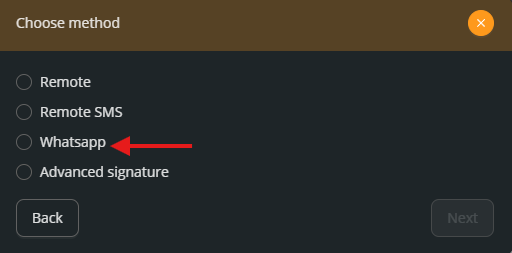
The help center guide Send a Document for Signature via WhatsApp shows each step with screenshots.
Bulk WhatsApp sending with CSV automation
If you need to send many documents at once, you can use WhatsApp in a CSV automation. In CSV Automation → Workflow, choose WhatsApp as the signing method. The Phone field appears, where you can:
- map a CSV column, so each document reaches its signer’s number, or
- enter a fixed number.
Review signatures sent via WhatsApp
In Profile → Contracted products → Sign history, the signing method filter includes the WhatsApp Sign option. When you choose it you see only the signatures sent via WhatsApp, and the summary counters and the Excel download respect the filter.
What gets recorded
WhatsApp sending is part of Legale’s signing process, so the document keeps the electronic evidence that process records:
- delivery confirmation,
- access log,
- electronic evidence record,
- date, time and IP address, and
- document integrity checks.
Which documents it’s for
WhatsApp signing works well for high-volume processes or tight deadlines, such as:
- employment contracts and other HR documents,
- service agreements and powers of attorney,
- non-disclosure agreements (NDAs),
- supplier onboarding, and
- B2B and B2C sales.
If a document requires an advanced electronic signature, choose the Advanced signature method when adding the signer. And if it needs a notary’s authorization, Legaliza connects you with notary offices.
Frequently asked questions
Does the signer need a Legale account?
No. They receive a secure link via WhatsApp and sign from their phone without logging in to the platform.
What do I need to send a document via WhatsApp?
The signer’s contact must have a registered phone number.
Can I send many documents at once?
Yes. With a CSV automation you can map the phone column and send the requests in bulk.
How do I know which signatures were sent via WhatsApp?
In the signature history, filter by the WhatsApp Sign method. You can also download that list in Excel.
Want to see how it works in your processes? Contact us and we’ll show you WhatsApp signing in a demo.